
What the thing is meant to do, and the few limits that actually matter.
BUILDBOOK // MEMORY FOR THINGS I MAKE
Stop solving the same problem twice.
IDEA → BUILD → TEST → BREAK → LEARN → DOCUMENT → SHARE
BuildBook grew out of a simple problem: I kept learning useful things from prototypes, then Future Me had to work out what the hell Past Me had already figured out.
A folder full of STLs can tell me what existed. It cannot tell me why a gap changed, what was physically tested, which “improvement” already failed, or why the final release deliberately left a proven part alone.
BuildBook is the memory layer around the files. It is not meant to turn a hobby print into bureaucracy. It is meant to preserve enough context that the next design session starts from what we already know.
THE SHORT VERSIONWhat I wanted to make, what changed, what I tested and what still needs trying.
That is much more useful to a human — and to an AI assistant — than a pile of filenames and a vague memory.
01 // WHAT IT KEEPS
The bits an STL cannot remember.
What changed between prototypes and why those changes were made.
Fit tests, print photos, failures, measurements and what I actually proved on the bench.
Things that already work and should not be casually redesigned by the next clever idea.
Whether it only exists in CAD, slices cleanly, has been printed, has been function-tested, or is genuinely ready to share.
Enough notes that Future Me can pick it up again without archaeology.
02 // WHY AI MAKES THIS MORE IMPORTANT, NOT LESS
AI is a force multiplier. So is forgetting what already worked.
AI can produce another idea very cheaply. That is useful right up until “another idea” quietly replaces a part that already worked, reintroduces an old failure or invents a detail nobody measured.
BuildBook gives the next session a grounded starting point: dimensions, the parts that worked, the approaches that failed, what I was trying to achieve and what still needs a real test. It does not make the AI infallible. It simply removes a lot of unnecessary guessing.
PUBLIC EXAMPLE // A RARE LOOK BEHIND THE CURTAIN
Salt & Pepper Caddy V1.0.0
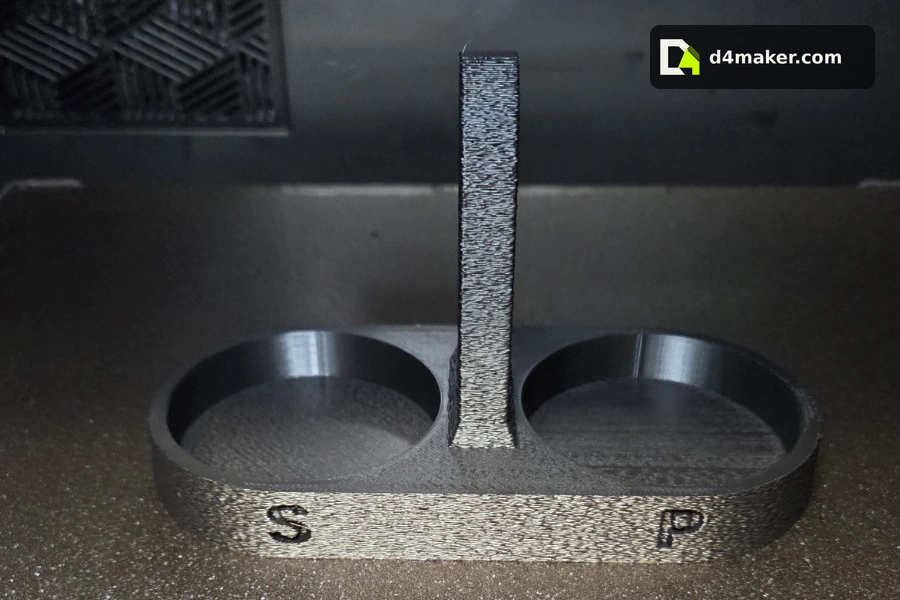
The first public BuildBook example comes from a deliberately ordinary problem: two grinders leaving salt and pepper dust on the table.
The BuildBook records the transition from V0.1.0 to the physically successful V0.1.1 candidate: the proven 58 mm pocket fit, 12 mm depth, dual-side lettering, underside pad recesses, support-free intent and the decision to keep the centre feature as a compact repositioning grip instead of turning it into a giant handle.
Why the version numbers differ: V0.1.1 is the version I physically proved. V1.0.0 is the public release of that same design, unchanged.
03 // THE PROJECT LOOP
BuildBook sits between “make something” and “remember what happened”.
Problem / goal→Model / source→Print→Inspect / test→Keep the proof→Change it or leave it alone→Release
The exact documents can vary with project size. The principle does not: preserve the evidence and the reason behind decisions before the context evaporates.
04 // WHERE IT LED
Once the project has structure, other tools can build on it.
The same discipline feeds the website, release packaging, parametric generators and future AI-assisted design sessions. The Soccer Bag Tag customiser is one visible result: someone can change a name or size and get a model without starting from scratch or needing my whole CAD setup. A changed fit still needs checking.
BuildBook is the opposite of pretending every project starts fresh. It is the boring little memory system that lets the interesting work move faster.